

Die TeamDrive Lösung
Das Kernelement, welches all Ihre Anforderungen im Bereich Datenaustausch, Kollaboration und hochsichere Verschlüsselung abdeckt, ist unsere Anwendung TeamDrive Professional.
In der Grundkonfiguration ist TeamDrive Professional bereits an eine hochverfügbare Cloud mit Standort Deutschland angebunden. Sie können mit Teamdrive also sofort starten.
Alternativ zu dieser Cloud-Anbindung kann TeamDrive Professional auch auf eigenen Servern oder im Mischbetrieb Cloud/eigene Server genutzt werden (On Premise / Hybrid).
Keine Rolle spielt, ob nur einige wenige Mitarbeiter oder ganze Unternehmensbereiche TeamDrive Professional nutzen möchten.
Denn TeamDrive ist jederzeit – auch im laufenden Betrieb - unbegrenzt skalier- und erweiterbar!
Nachfolgend finden Sie im Bereich TeamDrive Professional alle Leistungsmerkmale, Einsatzmöglichkeiten und Lösungen, die Ihnen TeamDrive standardmäßig immer bietet.
Weitere Möglichkeiten - meist nur für größere Kunden mit speziellen Anforderungen interessant - haben wir für Sie im Bereich TeamDrive KMU/Enterprise zusammengefasst.
Datenaustausch
Sicherheit
Alle Basis-Leistungen von TeamDrive Professional im Überblick
Wichtig für Sie zu wissen: Sie können TeamDrive Professional jederzeit erweitern!
Sie können zusätzliche Nutzerlizenzen hinzubuchen, Speicherplatz oder weitere Leistungen wie z.B. den Digitalen Briefkasten, die Mobile-App SecureOffice oder auch die TeamDrive Server-App
Außerdem haben Sie selbstverständlich immer die Möglichkeit, Ihr TeamDrive um sämtliche Komponenten und Leistungen zu erweitern, welche wir für spezielle Anforderungen anbieten.
Sie finden diese TeamDrive-Erweiterungen auf dieser Seite im Reiter KMU/Enterprise
2) Bitte beachten Sie unser Freundschaftseinladungsprogramm (Family&Friends)
Freie Serverwahl
Integrationen
Die TeamDrive-Architektur
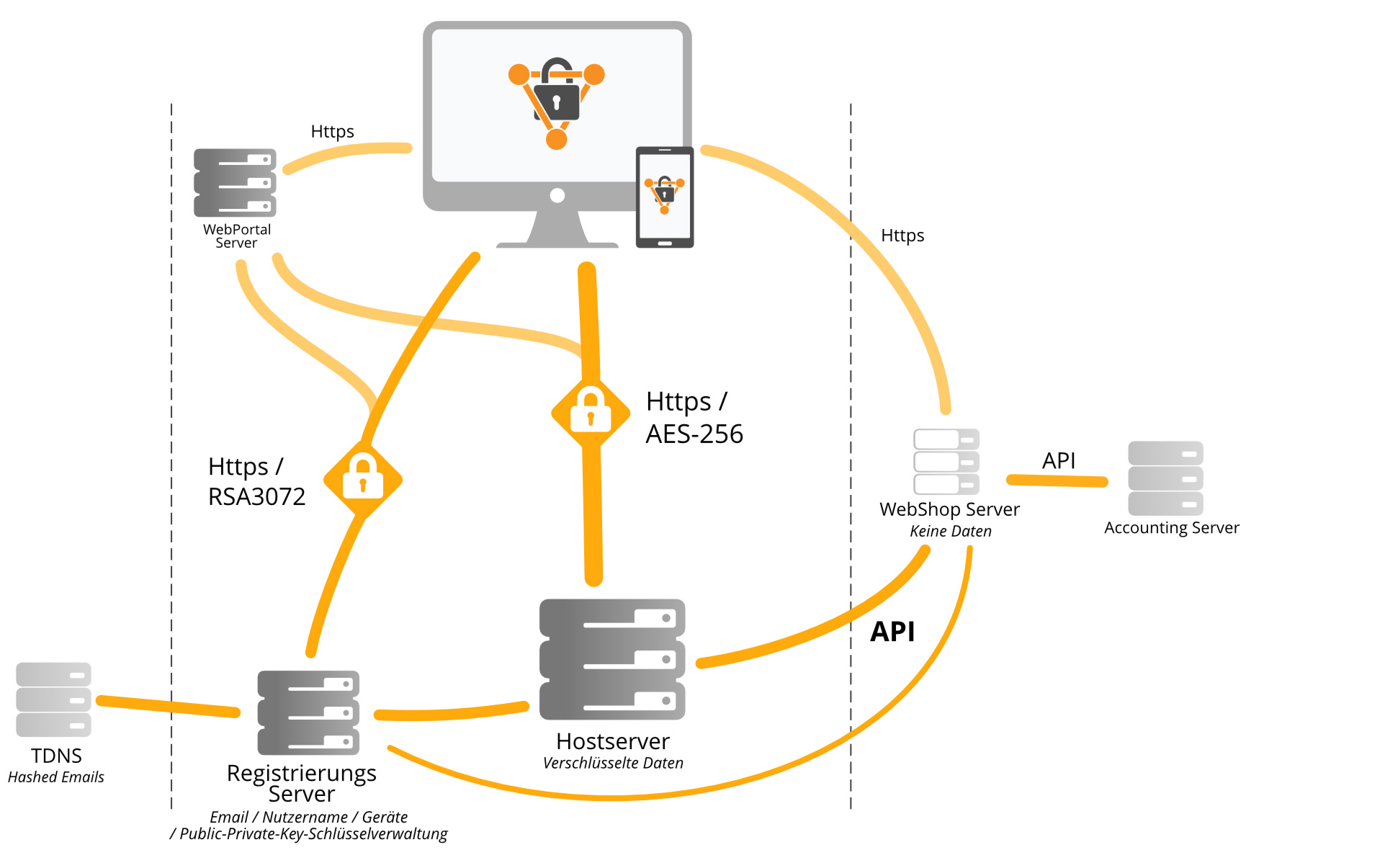
Im Standard bieten wir Ihnen mit der TeamDrive Professional Cloud eine Lösung, mit der Ihre Daten hochverschlüsselt auf Cloud-Servern in deutschen Rechenzentren gespeichert werden.
TeamDrive kümmert sich dann vollumfänglich um Hosting und Betrieb sämtlicher Server, welche Teil der TeamDrive-Architektur sind (siehe Erläuterung der Komponenten Hosting-Server, Registrierungs-Server und WebPortal-Server weiter unten).
Cloud, On Premise, Hybrid
Allerdings ist TeamDrive konsequet modular konzipiert und damit individuell an Ihre Unternehmensanforderungen anpassbar. Deshalb können Sie diese Server wahlweise von TeamDrive hosten lassen, aber auch unter Ihrer vollständigen Kontrolle selbst hosten und betreiben.
Dabei ist es Ihre Entscheidung, ob Sie sämtliche Server von TeamDrive hosten lassen (TeamDrive Cloud), ob Sie alle Server selbst hosten (On Premise) oder ob Sie teilweise selbst hosten und teilweise durch TeamDrive hosten lassen (Hybrid). Sie können auch bereits in Ihrem Unternehmen bestehende Server mit gehosteten Cloud-Services kombinieren.
Es besteht auch die Möglichkeit, ein OneDrive- oder Azure-Konto anzubinden bzw. diese externen Cloud-Speicher als Speicherort für Ihre verschlüsselten Dateien festzulegen. Somit können Sie Speicherplatz, der Ihnen beispielsweise aus einer Microsoft-365-Lizenz zur Verfügung steht, auch für den Betrieb von TeamDrive nutzen.
Den einzige Server, den Sie nicht selbst hosten können, ist der TeamDrive Global Name Server, kurz TDNS.
Der TDNS ist ein komplett anonymisierter Service, der von der Firma TeamDrive Systems betrieben wird. Er verwaltet die Integrität aller weltweit registrierten TeamDrive-Nutzer ohne jedoch Kenntnis von deren Nutzernamen und E-Mail-Adressen zu haben.
Der TDNS hat dabei zwei Aufgaben:
- Er stellt für alle existierenden Registrierungsserver sicher, dass jede E-Mail-Adresse und jeder Benutzername nur einmal im weltweiten TeamDrive-Netz (Kosmos) existiert und somit eindeutig und einzigartig ist.
- Zudem fragen alle Clients beim TDNS an, welche einen Benutzer einladen, der nicht an deren lokalem Registrierungsserver registriert ist, ob es diesen Benutzer bereits irgendwo auf der Welt gibt. Anschließend holen sie sich dann vom jeweiligen Registrierungsserver den gewünschten öffentlichen Schlüssel ab, sofern die Herausgabe des Schlüssels vom lokalen Administrator gestattet wurde.
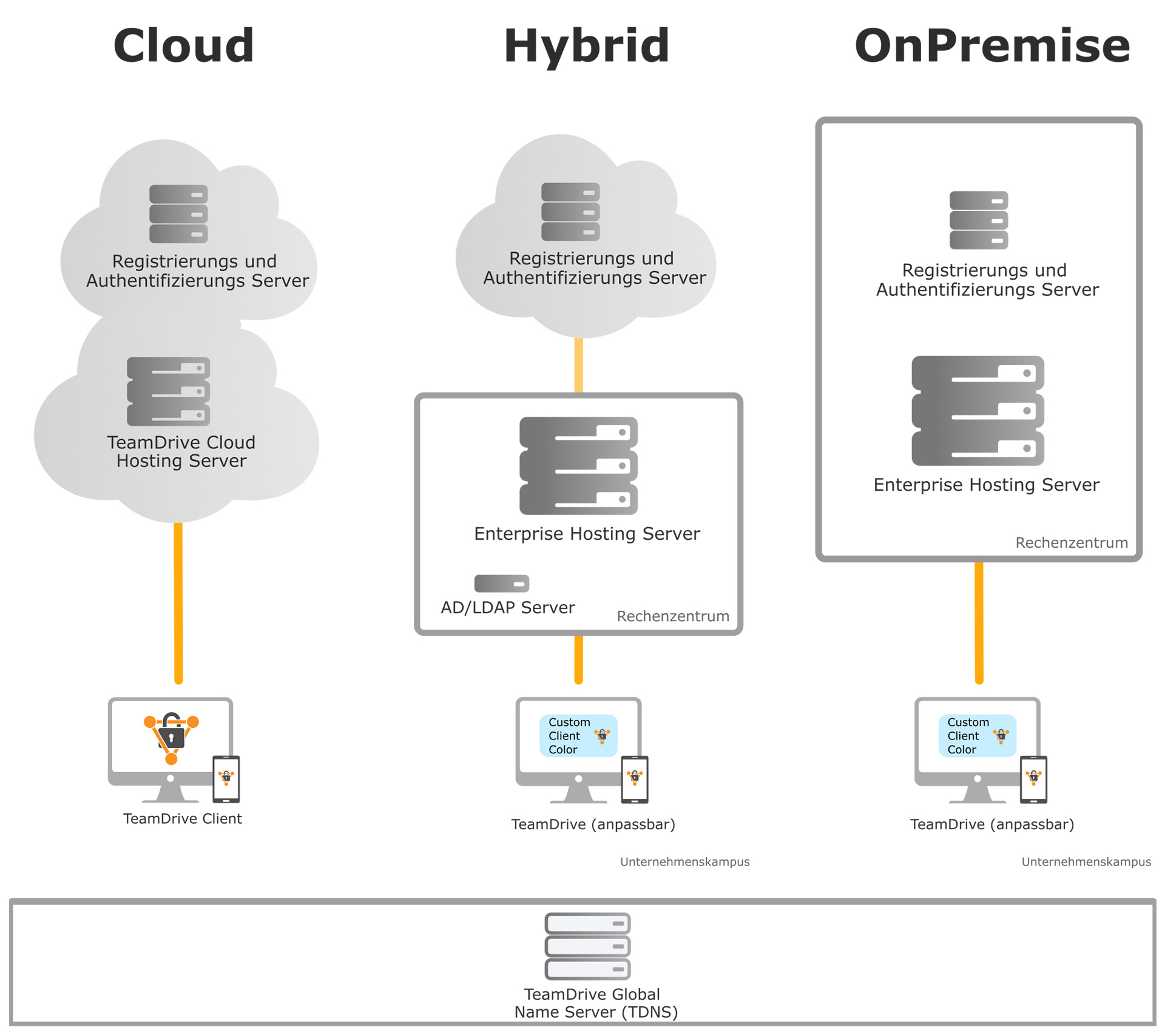
Jeder TeamDrive Client (z.B. die TeamDrive-App) kann sich mit mehreren TeamDrive Hosting-Servern verbinden und mit mehreren TeamDrive Registrierungsservern gleichzeitig kommunizieren.
Das Hosting der Server selbst zu betreiben, gibt Ihnen die volle Kontrolle über die Funktionalität und Konfiguration Ihrer Clients
Unabhängig von der gewählten Architektur, sind die Inhalte aller TeamDrive Spaces immer durch mehrere Verschlüsselungsebenen, automatische Schlüsselgenerierung und eine vollständige Ende-zu-Ende-Verschlüsselung basierend auf dem AES-256 Verschlüsselungsstandard abgesichert.
Die TeamDrive-Komponenten
Egal, wie Sie TeamDrive einsetzen wollen - ob vollständig in der TeamDrive-Cloud, Hybrid oder On Premise: Jede TeamDrive-Lösung besteht mindestens aus den Komponenten Hosting-Server, Registration-Server und einem TeamDrive-Client. Zusätzlich wird häufig auch der WebPortal-Server eingesetzt.
Auf dem Hosting-Server werden Ihre Dateien gespeichert. In unserer Standard-Cloud-Lösung TeamDrive Professional ist der Hosting-Server der TeamDrive-Cloud-Server – kurz: Die TeamDrive-Cloud. Diese liegt in einem deutschen Rechenzentrum und ist absolut DSGVO-konform.
Sollten Sie Ihre Daten lieber in Eigenregie bzw. im eigenen Haus hosten wollen, benötigen Sie den TeamDrive Enterprise Hosting Server.
Die TeamDrive Enterprise Hosting Server Software basiert auf der Linux/Apache/MySQL Umgebung und steht als vorinstalliertes VMware Image zur Verfügung, welches ein schnelles Deployment und ein einfaches Setup ermöglicht.
Der TeamDrive Enterprise Server unterstützt individuelles User Provisioning für Speicherplatz und Datenverkehr. Er kann bis zu 10.000 Benutzer pro Serverinstanz unterstützen und skaliert leicht auf Hunderttausende von Nutzern.
Alle auf dem Server gespeicherten Daten werden vollständig von den TeamDrive Clients (z.B. TeamDrive-App) vor der Übertragung verschlüsselt (AES-256) - also noch lokal auf dem Computer der Nutzer und noch vor der Übertragung über das Internet. Die Verschlüsselungs-Keys werden nur auf dem Computer der Anwender gespeichert. Sie sind vom Hosting-Server aus nicht zugänglich.
Das Management des TeamDrive Servers erfolgt über eine webbasierte Management-Konsole. Alternativ bietet der TeamDrive Server eine API, die es erlaubt, den Server zu verwalten und in jedes Helpdesk, ERM oder HTML-Portal zu integrieren.
Der TeamDrive Enterprise Server bietet auch eine Hybrid-Cloud-Funktionalität, die es Ihnen ermöglicht, mehrere Clouds (Private oder Public) zu betreiben, welche zwar eigenständige Einheiten bleiben, aber miteinander verbunden sind und die Vorteile mehrerer Deployment-Modelle bieten.
TeamDrive-Nutzer müssen authentifiziert und verwaltet werden. Wenn Sie unsere Standard-Cloud-Lösung TeamDrive Professional nutzen, kümmern wir uns vollumfänglich um Hosting und Betrieb dieses Servers.
Sollten Sie Nutzer-Registrierung und -Verwaltung jedoch selbst betreiben wollen, benötigen Sie den TeamDrive Enterprise Registration Server.
Der TeamDrive Enterprise Registration Server ist die zentrale Instanz für die verschlüsselte Client-Kommunikation. Er basiert auf einer Linux/Apache/MySQL/PHP-Umgebung und unterstützt typischerweise 10.000 Benutzer pro CPU Kern. Der Registration Server ist verfügbar als vorinstalliertes und vorkonfiguriertes VMware-Image, was eine schnelle Bereitstellung und einfache Einrichtung ermöglicht.
Der TeamDrive Enterprise Registration Server ist für die folgenden Aufgaben zuständig:
- Verwaltung der TeamDrive-Benutzer (konfigurierbar zur alternativen Nutzung verschiedener externer Authentifizierungssysteme)
- Verwaltung der TeamDrive-Client-Lizenzverwaltung
- Public Key (PKI) für alle Clients zur Ermöglichung einer RSA-3072 verschlüsselten Kommunikation
- Trust Center für verschlüsselte User Backup Space Key Repositories
- Multi-Tenant Lösung, die mehrere vordefinierte Client-Konfigurationen hosten kann
Die einfach zu bedienende, webbasierte Verwaltungskonsole ermöglicht erweiterte Helpdesk-Aufgaben und Mobile Device Management-Funktionalität, wie z.B. Remote Wipe von Geräten. Sie bietet außerdem eine API zur Unterstützung der kundenspezifischen Integration mit anderen Systemen.
External Authentification Option (AD/LDAP, Oauth 2.0, ADFS und Vasco)
TeamDrive unterstützt eine externe Authentifizierung. In dieser Konfiguration liegen die Authentifizierungsdaten nicht auf dem TeamDrive Registration Server selbst, sondern verweisen auf den externen Verzeichnisdienst für Single Sign On Zwecke (SSO).
Der TeamDrive Client kann ein alternatives Anmeldefenster in Form eines eingebetteten Webbrowsers anzeigen. Standardmäßig ist dieses Panel deaktiviert, kann aber explizit durch Senden der entsprechenden Client-Einstellungen vom Registrierungsserver aktiviert werden.
Ein Beispiel PHP-Code zur Anbindung an ein bestehendes AD/ LDAP System über das TeamDrive Web-Authentication-Verfahren ist enthalten.
Um mit TeamDrive arbeiten und dessen Funktionen auf Ihren Geräten nutzen zu können, stehen Ihnen diverse Apps (Clients) zur Verfügung, welche nachfolgend vorgestellt werden.
TeamDrive-App
Die TeamDrive-App ist die Standard-Anwendung zur Benutzung von TeamDrive auf Ihrem PC unter Windows, MacOS, Linux oder Ihren mobilen Geräten mit iOS oder Android. Sie beinhaltet alle Funktionen zur Datenverwaltung.
Auf unserer Downloadseite finden Sie die App zum Herunterladen für alle genannten Betriebssysteme.
Die meisten der in der App angebotenen Funktionen stehen Ihnen aber auch in der TeamDrive Web-App zur Verfügung (siehe Kapitel zur Web-App). Mit der Web-App können Sie TeamDrive browserbasiert und gänzlich ohne Installation der TeamDrive-App benutzen.
Web-App
Sie können auf Ihre Daten sogar völlig ohne Installation einer TeamDrive-App zugreifen – nämlich browserbasiert via Web-App. Die meisten Funktionen der TeamDrive-App stehen Ihnen auch hier zur Verfügung.
Häufig wird die Web-App von Gastnutzern in Anspruch genommen, welche aus verschiedenen Gründen keine Software-Installation auf ihren Geräten vornehmen möchten oder können.
Die Web-App ist über den entsprechenden Link im Navigationsmenü unserer TeamDrive-Website erreichbar. Zum Einloggen in die Web-App nutzen Sie bitte die Zugangsdaten zu Ihrem TeamDrive-Benutzerkonto.
Server-App
Weiterhin können Sie unsere TeamDrive Server-App nutzen. Die TeamDrive Server-App (vormals: TeamDrive Agent) ermöglicht Ihnen, TeamDrive auf einem Server zu installieren.
Sie bietet u.a. alle Funktionen und Leistungen der TeamDrive-App - allerdings ohne deren grafische Bedienoberfläche.
Die TeamDrive Server-App ist vorrangig für System-Administratoren interessant, die Ihre Server konsolidieren wollen. Sie dient u.a. dazu, dass vorhandene lokale Laufwerksfreigaben unverändert weiter genutzt werden können.
Außerdem sorgt sie dafür, dass die Daten als Backup in der Cloud gesichert werden, sowie auch, dass Mitarbeiter von außerhalb des Firmennetzwerkes sicher auf die Daten zugreifen können - ohne aufwendige und kostspielige VPN-Verwaltung.
Die Server-App stellt eine offene API zur Verfügung, was die einfache Anbindung von Fremdsystemen an die sichere Datenübertragung von TeamDrive möglich macht.
Erfahren Sie noch mehr zu den Vorteilen und den Möglichkeiten der TeamDrive Server-App bietet!
Der TeamDrive WebPortal-Server ermöglicht die browserbasierte Nutzung von TeamDrive via TeamDrive Web-App. Dazu ist nicht einmal die Installation einer TeamDrive-App auf Ihrem Computer notwendig.
Häufig wird die Web-App von Gastnutzern in Anspruch genommen, welche nicht selbst TeamDrive-Anwender sind und aus verschiedenen Gründen auch keine Software-Installation auf ihren Geräten vornehmen möchten oder können.
Die meisten Funktionen, die Ihnen die TeamDrive-App bietet, stehen Ihnen auch in der Web-App zur Verfügung. Die Web-App ist über den entsprechenden Link im Navigationsmenü unserer TeamDrive-Website erreichbar. Zum Einloggen in die Web-App nutzen Sie bitte die Zugangsdaten zu Ihrem TeamDrive-Benutzerkonto.
Der WebPortal Server startet für jeden Nutzer eine eigene Instanz in einer Sandbox, in welcher wiederum der Web-Client (Web-App) des angemeldeten Benutzers gestartet wird.
Zur Laufzeit werden diejenigen Dateien der Spaces entschlüsselt im RAM vorgehalten, welche der Anwender im Browser anfordert.
Nach Beendigung der Sitzung wird der Inhalt der Sandbox verschlüsselt gespeichert. Dieser ist ausschließlich von den Clients authentifizierter Benutzer wieder zu entschlüsselbar.
Das bietet Ihnen TeamDrive
Hinweis:
Der redaktionelle Inhalt wurde mit bestem Wissen und Gewissen, unter Ausschluss eines Anspruchs auf Vollständigkeit sowie jeglicher Haftung erstellt. Der vorliegende Inhalt stellt weder eine individuelle rechtliche, buchführungstechnische, steuerliche oder sonstige fachliche Auskunft oder Empfehlung dar. Er ersetzt keine Beratung durch fachkundige Personen unter Berücksichtigung des konkreten Einzelfalls.